What is an AI Logo Generator?
Creating a logo no longer requires you to hire a professional designer or spend hours mastering design software. If you run a small business or are starting a new project, you need a fast and effective way to build your brand identity. That’s where an AI logo generator can really help.
The AI logo generator is powered by artificial intelligence. It lets you automatically create a unique logo based on inputs like your brand name, business type, style preferences, and color choices. You don’t need any design knowledge. AI instantly generates logo options for you.
How It’s Different from Traditional Logo Makers
You might be familiar with template-based logo tools. These usually offer ready-made logos that you can tweak by changing text or color. But the problem is, those templates are often used by thousands of people, meaning your logo won’t be very original and might even look like someone else’s.
An AI logo generator is more advanced than templates. It doesn’t just give you a pre-made design. You get brand-new logo concepts that reflect your brand’s personality. The result is a more distinctive logo that’s aligned with your brand’s goals.
From Static Templates to Generative Intelligence
In the past, designing a logo meant manually selecting icons, dragging elements, and tweaking every little detail. Now, with generative AI, the process is smarter and faster. The system analyzes typography patterns, color theory, layout balance, and industry trends to build new logo options tailored to your brand.
You just enter a brand description like “modern tech company with a clean, minimalist style,” and the AI instantly generates a variety of logo variations. You can preview them in real time, pick your favorite, and adjust if needed.
Why You Should Try It
Using an AI logo generator saves time, reduces cost, and allows you to explore more ideas than usual. You get instant results, complete creative control, and a professional-looking logo without being a designer. In summary, if you need a quick, affordable way to create a unique logo, an AI logo generator is a smart solution. Just input your brand details and let the AI do the work.
1. How AI Works in Logo Design: Core Technologies Behind It
The secret behind an AI machine’s ability to design something as creative as a logo lies in combining AI technology that mimics human decision-making and artistic sense. Understanding how these work helps you use AI tools more effectively and set realistic expectations.
Machine Learning: Learning from Patterns
At the core of many AI logo generators is machine learning (ML). These models are trained on thousands of logos to recognize what makes a design look “professional,” “modern,” or “playful.”
- Supervised learning matches design elements with specific outcomes.
- Unsupervised learning groups similar logo styles or uncovers new element combinations.
- Some tools even use reinforcement learning, where the AI learns over time based on user feedback, like which logos get selected most often.
Deep Learning and Generative Models
To actually generate visuals, AI relies on deep learning. Convolutional Neural Networks (CNNs) help the system recognize shapes, icons, and visual structure. Generative Adversarial Networks (GANs) allow the AI to create entirely new designs that look realistic and polished.
Variational Autoencoders (VAEs) help explore design variations while maintaining stylistic consistency, enabling multiple versions of a logo that feel cohesive.
Natural Language Processing: Understanding Your Prompts
When you type something like “a bold, futuristic logo for a finance app,” the system uses Natural Language Processing (NLP) to understand your intention. NLP lets AI extract tone, style, emotion, and meaning from your text and turn it into visual ideas.
This makes the process intuitive. You describe what you want, and AI translates it into visuals.
Computer Vision: Seeing Like a Designer
Computer vision gives AI the ability to analyze shapes, icons, and composition like a designer. It checks visual harmony, contrast, and spacing to ensure the final result looks neat and professional.
Some AI tools even scan large logo databases to recognize trends and suggest elements that match your brand needs.
Behind the Scenes: Datasets, Prompts, and Design Rules
The source of AI’s capabilities comes from the data used to train it. The system learns from large datasets of high-quality logos, branding guidelines, and visual identities. This is combined with prompt engineering (carefully crafted user input) and design principles (like alignment, hierarchy, contrast) to produce visually coherent logos.
2. Features of AI Logo Generators
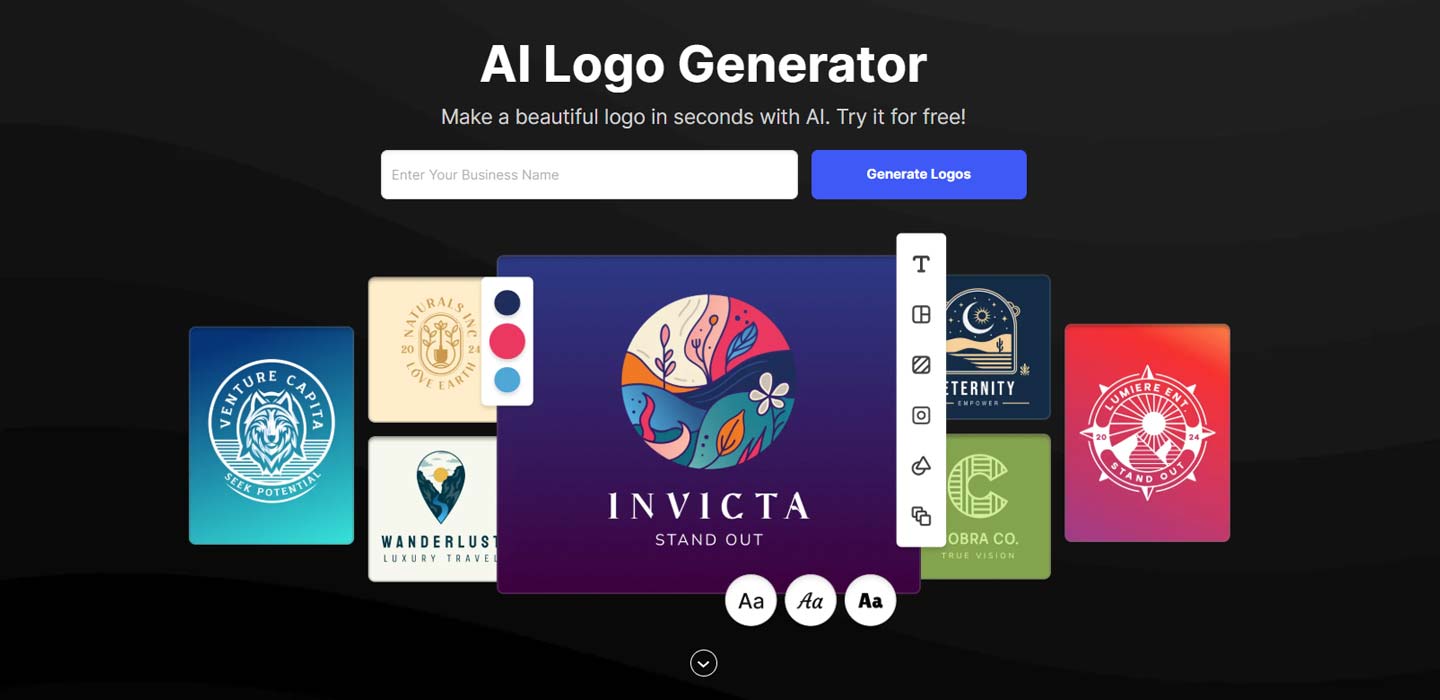
When choosing an AI logo generator, it’s important to know which features matter. These determine how flexible and on-brand your final logo will be.
Easy Text Input for Your Brand Identity
You usually begin by entering your brand name, slogan, and a short description of your business. It may seem simple, but it’s really important. AI uses this information to understand your brand’s tone and message. For example, if you input “Green Leaf Organic, healthy food for an active lifestyle,” the AI might suggest clean, nature-inspired designs with green and earthy tones.
Style Options and Visual Themes
Most AI logo tools let you pick a visual style upfront, such as modern, minimal, cheerful, vintage, or techy. These options guide the design direction so the AI stays in line with your creative vision.
Automatic Color Palettes and Layout Suggestions
Choosing the right colors can be tricky, especially if you’re not a designer. The AI logo generator will provide a color palette that matches your brand identity. They also automatically generate layout suggestions, showing you the best way to arrange icons, text, and taglines for readability and balance.
Manual Customization Tools
While AI handles much of the work, you still have the option to customize. Most platforms include basic editing tools to:
- Change fonts and text size
- Swap icons or shapes
- Adjust color palettes
- Reposition layout elements
This means you can start with AI-generated designs and refine them to feel more personal.
Real-Time Mockups and Previews
A standout feature is real-time mockup previews. You can see how your logo will look on business cards, packaging, social media headers, and even T-shirts. This helps you visualize the final result instantly.
Downloadable File Formats
Once you finalize your design, you can download it in formats like PNG, SVG, PDF, and JPG. Some platforms also offer EPS or AI files for advanced editing. You can usually select high-resolution exports, transparent backgrounds, and vector formats so your logo remains sharp at any size.
Integration with Popular Design Tools
Some AI logo generators integrate directly with tools like Canva, Figma, or Webflow. This makes it easy to further develop your branding assets without starting over.
A good AI logo generator balances automation with control. You can create, customize, preview, and export your logo easily. Just pick a tool whose features fit your workflow and needs.

3. User Workflow: From Idea to Download
One of the biggest advantages of an AI logo generator is its seamless, beginner-friendly workflow. In just a few steps, you can visualize your idea and turn it into a ready-to-use logo. Here’s a general user journey:
Input Phase: Define Your Brand Details
You start by entering important brand details. This sets the foundation, so be clear and specific.
Typically, you include:
- Brand name and slogan (e.g. “BrewNest, Quality Coffee Culture”)
- Industry or niche (food, tech, fashion)
- Style keywords (modern, elegant, bold, cheerful)
- Color preferences (e.g. green and beige for eco-friendly branding)
- Logo type (wordmark, emblem, abstract, etc.)
- Optional icons or symbols
The more specific your input, the more relevant the AI-generated results.
Generation Phase: Let AI Do the Hard Work for You
After you make your input, AI analyzes your request and image and then generates several logo variations. You’ll see options like different fonts, layouts (horizontal, stacked, left-aligned), color schemes, and icon variations. You can scroll through the results and pick the concept that best fits your vision.
Customization & Refinement
This is where you fine‑tune the design. You might love the AI result as is, or you might tweak it a bit. Most platforms let you adjust:
- Fonts (size, weight, style)
- Color palette
- Icons (swap or remove)
- Layout alignment
- Add/remove design elements
Some tools even let you preview edits in mockups, so you see how your logo looks on packaging, cards, or websites.
Export & Download
When you’re happy with the final design, it’s time to export. You can usually download your logo as:
- PNG (for web and digital use)
- SVG or EPS (for print and scaling)
- PDF (for documents and presentations)
- JPG (common, lightweight format)
Most tools offer high-resolution files with transparent backgrounds, so your logo is ready for any platform.
Brand Kit Integration (Optional)
Some advanced platforms offer a brand kit, which includes:
- Logos in various formats and sizes
- Social media banners
- Brand guidelines (fonts, colors, spacing)
- Business card templates
If you’re building a brand from scratch, this saves time and ensures consistent branding across channels.
The AI logo creation process is fast, intuitive, and customizable. From inputting your brand name to downloading assets, you maintain full control over your logo.
4. Who Should Use an AI Logo Generator?
Not everyone has the time, budget, or design skills to create a logo from scratch. That’s why AI logo generators exist. They’re fast, easy, and affordable, making them suitable for many users. If you’re unsure whether it’s right for you, here are common user types:
Small Business Owners and Startups
Launching a small business means limited time and resources. You need to move quickly, and waiting weeks for a designer isn’t always realistic. AI logo generators let you get a professional-looking logo in minutes, so you can focus on building your business without endless revisions.
Entrepreneurs and Freelancers
Working on side projects or building a personal brand? You might not need a full design agency. AI lets you create sleek designs without learning software or hiring a designer. It’s perfect for experimenting and testing visual directions.
Content Creators and Bloggers
Your brand is your identity online. Whether you’re starting a YouTube channel, podcast, or lifestyle blog, you want your logo to reflect your personality and niche. AI lets you experiment with styles, colors, and icons so your logo works across thumbnails, banners, and social profiles.
Non‑Designers and First‑Timers
Never designed a logo before? No problem. AI logo generators are intuitive and visual. You don’t need to understand technical terms like kerning or negative space. Just follow the guided steps for a logo you’re happy with.
Developers and Marketers
If you’re building a landing page, pitch deck, or MVP, you need visual representation fast. An AI-generated logo gives your project credibility and style, even in early development. It’s also great for testing multiple brands or campaigns quickly without disrupting your workflow.
Personal Projects and Temporary Brands
Not every logo is permanent. Sometimes you need a quick placeholder for an event, a prototype, or a school task. AI logo generators are ideal for fast, temporary designs.
In summary, whether you’re a business owner, freelancer, or beginner, AI logo generators provide an efficient, cost‑effective way to build your visual identity.
5. Benefits of Using AI for Logo Design
Designing a logo used to be long, expensive, and intimidating. But AI tools have changed that. Now, anyone can create high‑quality logos in minutes, even without prior design experience. Here are the main benefits:
Speed and Efficiency
The most obvious advantage is speed. Traditional logo design can take days or weeks in briefing, concept development, and revisions. With AI, everything happens in a few clicks. Input brand details, choose a style, and get logo options instantly. This is crucial when launching a product quickly.
Cost‑Effectiveness
Hiring a professional designer is great but expensive. For those on a budget, AI offers an affordable alternative. Most AI tools let you try for free and only charge when you download high‑quality files. Compared to agency fees, you can save hundreds of dollars without sacrificing visual quality.
Accessibility for Non‑Designers
You don’t need design theory, color psychology, or typography know‑how. AI logo makers guide you step by step with visuals, so you won’t feel overwhelmed. Describe your brand well, and you’ll get a logo that aligns with your expectations.
Wide Range of Options
Unlike fixed templates, AI creates multiple logo versions with different layouts, colors, and icons. This gives you the freedom to explore styles you might have never considered and pick what fits best.
Fast Iteration and Experimentation
Sometimes you only know what you like once you see it. AI lets you test different names, taglines, and visual directions quickly, without starting from scratch each time.
Idea Generation and Inspiration
Even if you don’t use the logo directly, AI-generated options can spark creative ideas. You might discover fonts, color combinations, or symbols you love and incorporate them into another design.
Scalability for Multiple Projects
If you manage multiple brands, events, or product lines, AI tools help you create consistent and scalable visuals across different initiatives.
6. Limitations & Challenges of Using AI Logo Generators
AI logo generators are powerful, but they aren’t perfect. While they offer speed and convenience, there are some limitations you should know to manage expectations.
Limited Originality
Since AI is trained on existing design patterns and datasets, it tends to produce familiar visual styles. That means some generated logos may look similar to one another, especially among users choosing similar styles or keywords.
It’s not that your logo will be a direct copy, but it may lack the uniqueness of a custom design. To counter this, make sure to customize your logo post-generation, change icons, fonts, and color schemes for a more distinctive result.
Less Control for Complex Design Needs
If you have a specific design vision, like a hand-drawn symbol or detailed illustration, AI may not capture it accurately. AI generators excel at clean, modern designs but can’t fully replace high-end custom work.
May Not Capture the Full Brand Story
A logo isn’t just a visual. It reflects your brand’s values, mission, and character. Although AI interprets some inputs, it may not grasp the emotional or cultural depth you want to convey. That’s why many companies still work with human designers who can translate abstract brand narratives into visuals.
Copyright and Legal Concerns
This is a critical area. Not all AI-generated logos are guaranteed original, and some platforms have unclear licensing terms. Before using a logo commercially, check the platform’s user rights. Make sure you can trademark it and use it across brand assets.
File Format and Feature Limitations
Some tools only export basic formats like PNG or JPG, requiring payment for vector files like SVG or EPS. Without a vector version, scaling up your logo for print or large formats becomes difficult. Also, some platforms limit editing features after download. So ensure you’re happy with the design first.
Over‑Reliance on Algorithm Output
It’s easy to fall into the mindset that “AI knows best.” But ultimately, you’re in charge. Deciding what looks good, conveys your brand, and resonates with your audience. Use AI as a starting point, not an authority.
In conclusion, AI logo generators are powerful tools, but not magic. Treat them as the beginning of your branding journey, not the entire strategy. Blend automation with your creativity and brand insight for the best outcome.
7. Best AI Logo Generator Tools
With so many AI logo generators available, choosing one can be confusing. To save time, here’s a quick guide to some of the most popular and trusted tools in 2025 widely used by small business owners, freelancers, and creators:
Looka
Best for: Complete branding & brand kits
Looka is known for its clean, professional logos based on your inputs. What sets it apart is its comprehensive brand kit, business cards, social templates, brand guidelines.
Pros: Easy to use, strong mockups, ideal for full branding.
Cons: Designs can feel a bit generic if not customized further.
LogoMakr
Best for: Quick, simple logo creation
If you want a simple logo fast, LogoMakr is straightforward and intuitive. Its drag-and-drop interface and AI-generated suggestions are beginner-friendly.
Pros: Simple, free trial available.
Cons: Limited customization, less unique designs.
Brandmark
Best for: Tech startups and modern, geometric styles
Brandmark uses advanced AI to generate logo ideas from text input and keywords. It tends to produce modern, geometric designs.
Pros: Unique layouts and sleek interface.
Cons: Limited editing tools unless you upgrade.
Wix Logo Maker
Best for: Seamless integration with Wix websites
If you’re building a site on Wix, its logo maker is a perfect match. The AI generates logos you can apply directly to your site.
Pros: Easy Wix integration, streamlined branding.
Cons: Less flexible outside the Wix ecosystem.
Tailor Brands
Best for: Full business branding (domains, social media, legal)
Tailor Brands isn’t just for logos. It also helps with domain registration, social media graphics, and even legal services. Great if you’re building a brand from scratch.
Pros: All‑in‑one platform with solid design quality.
Cons: Subscription‑based pricing that can add up.
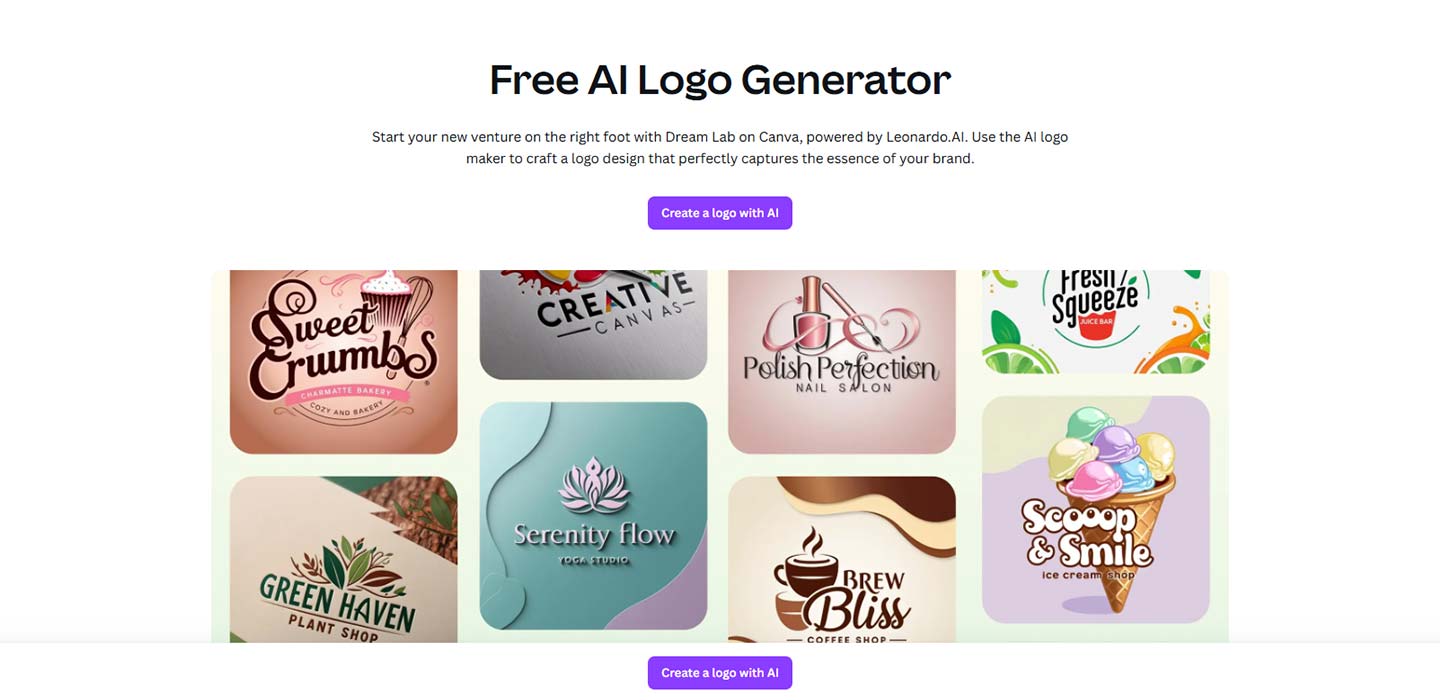
Canva (AI Logo Maker)
Best for: Visual control and template variety
Canva’s AI logo tool is built into its main design platform, offering a balance between automation and manual editing.
Pros: High customization, large icon library, drag‑and‑drop ease.
Cons: Logos may feel less unique without extra editing.
LogoAI.com
Best for: Fast branding for new businesses
LogoAI provides automatic logo creation, mockups, and consistent visual identity across formats.
Pros: Quick results, multiple export formats.
Cons: Less comprehensive for advanced design needs.
Designs.ai (LogoMaker Tool)
Best for: All‑in‑one marketing AI tools
Part of the Designs.ai suite, including video, voice, and AI copywriting tools. Its logo maker is robust and supports multilingual branding.
Pros: Multifunctional platform, great for content creators.
Cons: Interface can feel crowded for beginners.
Conclusion: Each AI logo tool has its strengths. For full branding packages, try Looka or Tailor Brands. For speed and simplicity, go with LogoMakr or Wix. You can choose Canva for design flexibility. Test a few, find what fits your workflow, and don’t forget to customize!
8. How to Choose the Right AI Logo Generator
With so many options, picking the right one doesn’t require testing them all. What matters is finding a tool that aligns with your goals, budget, and creative preferences:
Look for Customization Flexibility
Not all AI tools give you the same level of control. Some let you adjust every element, such as font, color, icon, spacing, while others only offer basic edits. Make sure your chosen tool allows enough customization for a unique and personal logo.
Check the Export Options and File Formats
Your final logo will be used in various contexts, such as websites, packaging, social media, and print.
Ensure your tool offers:
- High‑resolution formats (PNG, JPG)
- Vector files (SVG, EPS)
- Transparent backgrounds
- Commercial usage license
Without these, your logo may not look sharp or could cause legal issues.
Compare Pricing and Licensing
Some AI tools are free to try but charge for downloads. Others use subscription models that include extras like mockups and brand kits.
Don’t just check the price, understand what’s included and whether the licensing allows trademark use and commercial distribution.
Read Reviews and Test Real Examples
Before committing, look at user reviews, watch demo videos, or review logos made with that tool. This gives you a clearer idea of its quality and style variety.
Match the Tool to Your Needs
Ask yourself:
- Do I only need a logo, or a full brand kit?
- Will I edit the logo in Canva or Figma later?
- Do I prefer a one‑click process or full manual control?
Your answers guide you to the right platform. Simple tools like LogoMakr and Wix for beginners, or deeper platforms like Looka and Tailor Brands for advanced branding.
9. Future Trends & Evolution of AI Logo Generators
AI logo generators have progressed rapidly and they’ll keep improving. As the technology advances, these tools will become smarter, more creative, and more tuned to specific brand needs. If you’re planning to use AI for branding in the future, here are some trends to watch:
Enhanced Creativity and Uniqueness
Future AI models won’t just combine shapes and colors. They’ll craft more original, artistic, and emotionally rich designs. Trained on broader and more creative datasets, logos will not just “look good,” but feel authentic to your brand.
Deeper Brand Understanding
AI will become better at grasping abstract concepts, brand values, communication tone, and target audience. Soon, generators might even analyze your website, mission statement, or social media style to create a logo that reflects your full brand identity, not just keywords.
Smarter Customization Tools
Expect dynamic, smarter editing tools, like automated suggestions during editing, layout adjustments based on industry, or voice-driven commands like “Make it more elegant” or “Add a tech vibe” with real-time results.
Integration with Augmented Reality (AR)
Imagine previewing your logo on real-world surfaces, such as store signage, product packaging, or uniforms, using your phone’s camera before finalizing it. AR-enhanced previews will let you visualize real-world logo performance ahead of time.
Personalized Design Recommendations
Future AI will suggest visuals based on industry trends, geographic market, and audience aesthetics. It won’t just generate. It’ll act like a creative consultant supporting your brand journey.
Human + AI Collaboration in Branding
AI won’t replace designers. It’ll become a creative partner. Designers and business owners will collaborate with AI to explore ideas faster, visualize concepts quickly, and reduce repetitive work. Raising quality and speeding up brand projects.
Ethical and Inclusive AI Design
As brands prioritize diversity and inclusion, future AI tools will be trained to avoid cultural bias and suggest designs that reflect diverse identities and styles, moving toward responsible, representative branding practices.
Deeper Integration with Marketing Tools
AI-generated logos will no longer be standalone. They’ll automatically produce social media graphics, email headers, ad visuals, and packaging designs consistent with your logo’s style. You’ll get cohesive branding across platforms without extra effort.
Conclusion: AI logo generators are evolving into powerful creative partners. As they grow smarter and more intuitive, you’ll have more opportunities to express your brand’s identity faster, better, and in ways that feel truly authentic.